


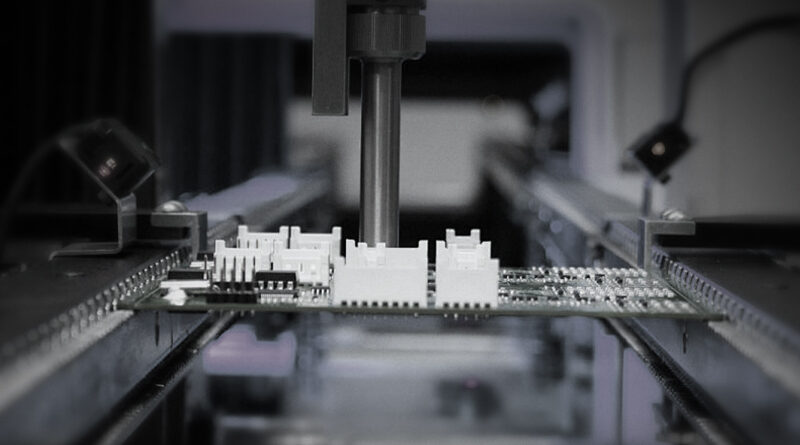
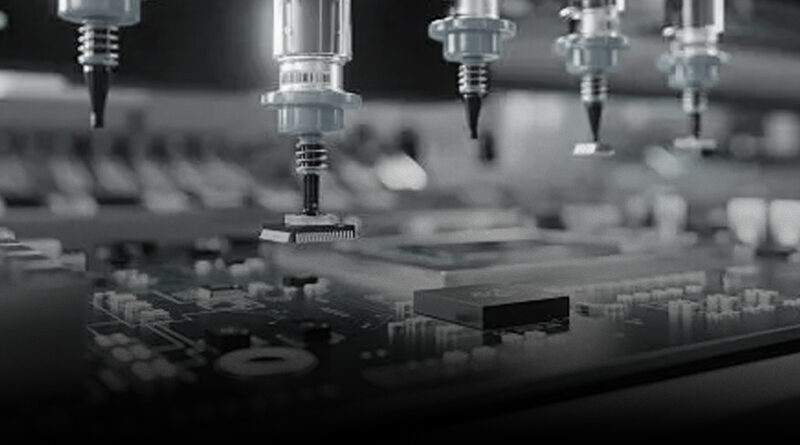
In the world of electronics prototyping, a reliable pick and place machine can be the difference between a week-long delay and a smooth, repeatable prototype run. Designers, engineers, startup teams, and university labs all wrestle with the question: How do we place tiny SMD components accurately and quickly without breaking the bank? The answer is not simply “buy the fastest machine.” It is about choosing a prototype-oriented pick and place system that fits your workflow, footprint, budget, and future needs. This guide blends practical, hands-on insight with a strategic lens to help you select and operate a prototype-friendly solution that accelerates your PCB development cycle.
The following sections draw on real-world demand observed in the market for SMT prototype workflows and the value propositions offered by integrators like NECTEC, a provider focused on a one-stop suite of SMT solutions. NECTEC’s offering emphasizes not only placing components, but a complete array of services—PCB handling, printing, soldering, inspection, conformal coating, and robust post-sales support. While you read, consider how a one-stop partner could reduce handoffs, minimize downtime, and keep prototypes moving from CAD to functional board.
What makes a great prototype pick and place machine
Prototype work has different priorities than high-volume production. A great prototype P&P machine balances precision with affordability and quick setup. Here are the top attributes to look for:
- Compact footprint and modular design: Small benchtop or desktop units save lab space and let you scale as needed. A modular feeder option and expandable head can accommodate new parts without a full system replacement.
- Accurate, repeatable placement: In prototypes, you’ll work with 0402s and even smaller parts. Look for a machine with a high-precision vision system, good nozzle control, and robust vibration dampening to ensure consistent placement.
- Flexible component handling: A system that can accept a mix of tapes, reels, and trays, plus a broad component range (0.5 mm to 8 mm pitch and beyond) is valuable for prototypes where designs frequently change.
- User-friendly software and CAD integration: Open formats, CAM-to-PLC compatibility, and intuitive programming reduce setup time. Real-time simulation, alignment checks, and fiducial-based calibration speed up iteration cycles.
- Reliable feeders and nozzles: Quick-change nozzles, a range of nozzle sizes, and easy maintenance reduce downtime between jobs, especially when you switch from large to tiny components.
- Vision-based alignment with fiducials: A built-in camera system that cross-registers board fiducials against the paste stencil or PCB features dramatically improves accuracy and reduces misplacement.
- Solder paste printing and reflow compatibility: For prototypes, the ability to print paste, place components, and reflow in a compact line is a big time saver. Some users opt for a combined station with a separate stencil printer.
- Service and support ecosystem: Prompt parts availability, remote diagnostics, and well-documented maintenance schedules prevent long downtime on critical prototype runs.
Desktop, benchtop, and compact systems: matching the space and budget
Prototype labs vary widely in space and funding, so it helps to categorize machines by size and intended use. Here are common classes and what they are typically best for:
- Desktop/benchtop systems: Ideal for early-stage prototypes and hobbyist labs. They’re generally affordable, easy to learn, and quick to deploy. They excel when component counts are modest (dozens to a few hundred parts per board), and boards are standard sizes.
- Compact, semi-automatic systems: These strike a balance between automation and control. They might require a small amount of manual loading or assistance for a portion of the workflow but deliver higher throughput and repeatability than pure manual methods.
- Mid-range production-adjacent machines: Labs that expect heavier prototyping activity or more complex boards can benefit from slightly larger platforms with more feeders, broader component support, and more sophisticated software for programming and calibration.
- Manual or assisted placement options: For some teams, layering a manual placement stage with a guided automation path is a cost-effective way to prototype boards that require a lot of unique components or unusual footprints before committing to a fully automatic system.
Key specifications to compare for prototypes
When evaluating options, translate specifications into practical outcomes for your prototypes. Here are the most consequential metrics and how they affect your work:
- Placement accuracy: Look for positional tolerance in the tens of micrometers. Higher accuracy is essential for fine-pitch components and dense boards.
- Component range and feeders: Ensure the system supports the common prototype components (0402, 0603, 0805, 1206) and offers a mix of feeder types. A versatile feeder ecosystem reduces rearrangement time when you switch designs.
- Vision and alignment: A camera-assisted alignment that recognizes fiducials and board features reduces misalignment and saves manual tweaking.
- Nozzles and vacuum: Quick-change, interchangeable nozzles cover a wide size range. A stable vacuum system maintains suction without losing hold of tiny parts.
- Board size and bed flexibility: A large enough workspace to accommodate typical prototype boards and test fixtures is important. A flexible bed with adjustable rotation and tilt helps with off-axis parts.
- Software workflow: CAM-to-machine integration, editable placement programs, and robust error-handling minimize downtime and training time for new users.
- Through-hole and mixed technology: If your prototypes include through-hole parts or mixed technologies, you may need a system with optional through-hole placement capability or dedicated modes for mixed assemblies.
- Power, air, and noise: Look for a system with clean power delivery and quiet operation, especially in shared lab spaces or classrooms.
Workflows that unlock rapid prototyping
Prototype success isn’t just about a machine; it’s about how you arrange the workflow around it. A lean, repeatable workflow minimizes cycle times and reduces human error. A typical prototype workflow includes:
- Design capture and BOM management: Use a robust CAD tool and ensure your BOM is clean, with clear footprints, reference designators, and manufacturer part numbers.
- Cam to NPI handoff: Prepare placement programs directly from CAD data or via CAM software that supports your board layout. Validate footprints and orientation before loading the board.
- Stencil printing or paste deposition: For boards requiring paste, ensure paste deposition is aligned with the first placement and that stencil alignment correlates with board fiducials.
- Pick and place sequence planning: Plan placement order to minimize head travel and reduce the risk of dragging components across populated areas of the board.
- Inspection and alignment checks: Early alignment checks catch issues before soldering. Consider integrating a basic AOI (Automated Optical Inspection) step after the reflow to verify solder joints and component presence.
- Reflow and cooling: A compact reflow oven or a small reflow area completes the prototype in a single line, minimizing handling and potential damage.
- Verification: Electrical tests, functional tests, and mechanical checks validate the prototype against the intended design. Document results for future iterations.
Case study: NECTEC’s end-to-end SMT support for prototypes
NECTEC presents a practical model for teams seeking a one-stop solution for prototype-driven PCB assembly. The company emphasizes integrated SMT workflows, combining component placement, soldering, printing, inspection, and coating with a strong emphasis on quality control at every stage. For a prototype shop, messaging such as “24/7 pre-sales assistance” and “post-sales service to sustain performance” translates into shorter procurement cycles and quicker problem resolution.
In a typical NECTEC-enabled workflow, a project might begin with a consultative intake that captures your design intent, component constraints, and anticipated production volumes. Their approach centers on aligning global suppliers to assemble a tailored solution—from board handling and paste printing to high-fidelity placement and board-level inspection. The benefit for prototype teams is not just hardware; it’s the confidence that the entire chain—from design to validation—has a single, accountable partner. This reduces risk and accelerates iteration cycles, a critical factor when you’re trying dozens of variant boards before locking in a final design.
The NECTEC model also acknowledges post-purchase support as a differentiator. Prototyping is iterative, and parts wear out, software receives updates, and calibration drifts can occur. A service ethos that promises ongoing training, spare parts access, and remote diagnostics helps teams stay productive even when the lab schedule becomes hectic.
Choosing the right prototype machine for your lab
Decision-making for prototypes is about reducing risk while keeping options open for future scale. Consider the following framework as you evaluate options:
- Map your board family: Start by listing the most common board sizes, the typical component sizes, and the worst-case footpoint density you expect to encounter in the next 12–18 months. This helps you select a system with adequate bed size and feeder capacity.
- Budget and total cost of ownership: Screen not only the upfront price but also consumable costs (nozzles, tapes, feeder replacements), maintenance time, and software subscriptions. A slightly higher upfront cost may pay off with reduced downtime and faster changeovers.
- Space and power constraints: A compact footprint with a sufficient power supply is essential for a lab with limited bench space or shared equipment. Ensure you have appropriate air and electrical provisions for the machine and its accessories.
- Software maturity: Favor systems with well-documented APIs or open software ecosystems that allow easy integration with your existing design tools and automation scripts. This is especially important for teams running frequent iterations or integrating with a larger test environment.
- Vendor support and training: Confirm how quickly you can get parts, what remote support looks like, and whether the vendor offers hands-on setup training. For educational labs and startups, this is often as valuable as the hardware itself.
- Future-proofing: If you anticipate expanding to more boards, more complex parts, or a secondary shift, choose a platform that can scale—whether through additional feeders, more advanced vision, or a more capable control software suite.
Practical tips for setup, maintenance, and longevity
Prototyping is a recurring activity. The longer your equipment runs without failure, the more iterations you can complete in a given week. Here are practical tips to keep your pick and place machine healthy and productive:
- Platen and nozzle care: Clean nozzles after every session to avoid clogged suction or inaccurate pickups. Keep spare nozzles on hand for quick swaps during a run.
- Calibrations and alignment: Schedule periodic calibration of the X, Y, and Z axes, nozzle offsets, and board fiducial recognition. A quick daily check can prevent surprises mid-run.
- Firmware and software updates: Apply updates from the vendor to benefit from bug fixes, improved alignment algorithms, and new features that enhance reliability.
- Environment control: Place the machine in a stable environment with controlled temperature and minimal dust. Use anti-static measures for boards and components to prevent latent damage.
- Maintenance log: Keep a simple log of maintenance tasks, part replacements, and deviations observed during runs. Data-driven ownership simplifies troubleshooting and upgrades.
- Inventory management: Maintain an organized stock of common components, feeders, and stencils. Quick access to materials reduces downtime during design sprints.
Workflow enrichment: expanding capabilities around prototyping
As your prototyping needs evolve, you may consider expanding the end-to-end chain with complementary equipment:
- Stencil printers: Combine a paste-print station with the P&P line for a streamlined paste deposition process, especially for boards with dense component clusters.
- AOI for quick validation: Add inexpensive AOI capacity to catch placement and soldering defects early, reducing rework on functional boards.
- Rework and repair stations: For prototypes that require design tweaks, a small rework station lets you fix issues without sending the board to a separate facility.
- Test fixtures and jigs: Invest in modular test fixtures that can adapt to multiple boards. This reduces repetitive setup time for functional testing.
Common questions about prototype pick and place machines
What is the minimum investment for a good prototype P&P system?
There is a wide spectrum. Entry-level desktop systems can start in the low thousands, while feature-rich compact machines with advanced vision can be six figures. The key is to align features with your expected workload. If you prototype dozens of boards per month with 0402 and 0603 parts, a mid-range desktop to compact system with decent vision and a manageable feeder set is often the best value.
Do I really need automated feeders for prototypes?
If your prototype cycles involve varied parts and frequent part changes, automatic feeders speed up changes and reduce manual handling errors. For teams that work primarily with hand-placed components or very small runs, manual placement with selective automation can be cost-effective.
How important is the vision system for prototype accuracy?
Very important. A robust vision system that recognizes fiducials and cross-registers board features dramatically improves placement accuracy, particularly on boards with tight pitch components or irregular layouts. It also reduces the learning curve for new operators.
Can NECTEC-like providers handle beyond-assembly needs?
Yes. A compelling value proposition in prototype environments is a partner that offers a complete SMT ecosystem—from paste printing and soldering to inspection and coating—so you have a single point of accountability for project success and faster resolution of issues that emerge during iteration cycles.
Takeaways and next steps
Prototype success hinges on selecting a pick and place solution that aligns with your board complexity, part range, workspace, and the velocity of your design iterations. Do not view the P&P machine as a standalone tool; instead, see it as a pivotal component of an end-to-end prototyping chain that includes design tools, CAM workflows, paste printing, soldering, inspection, and post-processing. A thoughtfully chosen system paired with a supportive partner can cut cycle times, reduce variance between prototypes, and accelerate learning across the team. If you are evaluating options, consider a plan that includes software onboarding, spare parts availability, and ongoing technical support—elements that translate into real-world uptime and faster project feedback loops.
As you plan your prototype line, reflect on your unique constraints: board size variety, component density, expected throughput, and the degree of process automation you are comfortable maintaining. By focusing on a practical balance of accuracy, flexibility, and service, you can create a prototype environment that not only accelerates development but also provides a stable foundation for eventual production handoffs. Whether you choose a compact desktop machine or a slightly larger semi-automatic system, the goal remains the same: reliable, repeatable prototyping that helps you validate designs, iterate quickly, and bring thoughtful electronics products to life.
For teams seeking a trusted partner to navigate these choices, NECTEC represents a practical model of integrated SMT solutions. Their one-stop approach—coupled with robust pre- and post-sales support—helps you move from concept to tested prototype with fewer bottlenecks and more confidence. In the dynamic world of electronics prototyping, a well-chosen pick and place machine, supported by a dependable ecosystem, is not just equipment—it is a competitive advantage.