


In the world of small-batch electronics, a desktop pick-and-place (PnP) machine is more than a gadget—it’s a bridge between hand-assembly and full-scale production. For makers, startups, hardware labs, and educational institutions, a reliable desktop PnP can dramatically shorten iteration cycles, improve consistency, and unlock a higher level of prototyping confidence. This guide dives into what desktop PnP machines are, what to look for when you choose one, how they fit into a modern SMT workflow, and how the latest models—from well-known veterans to new entrants—stack up in 2026. It also ties these machines into NECTEC’s one-stop SMT ecosystem, a practical lens for buyers who want end-to-end support.
What is a desktop pick-and-place machine?
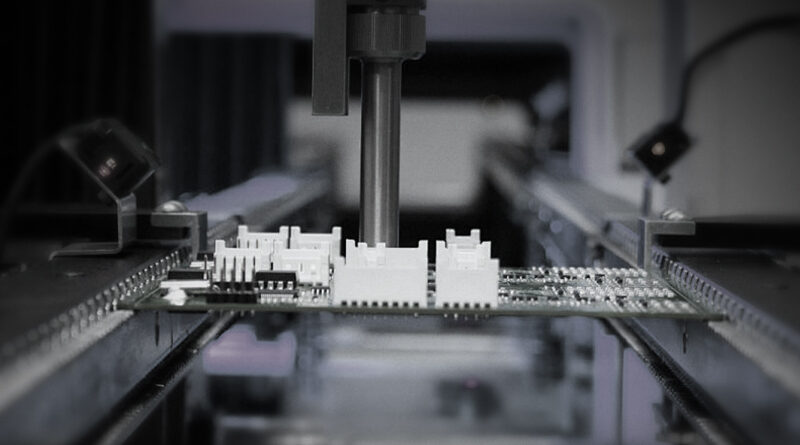
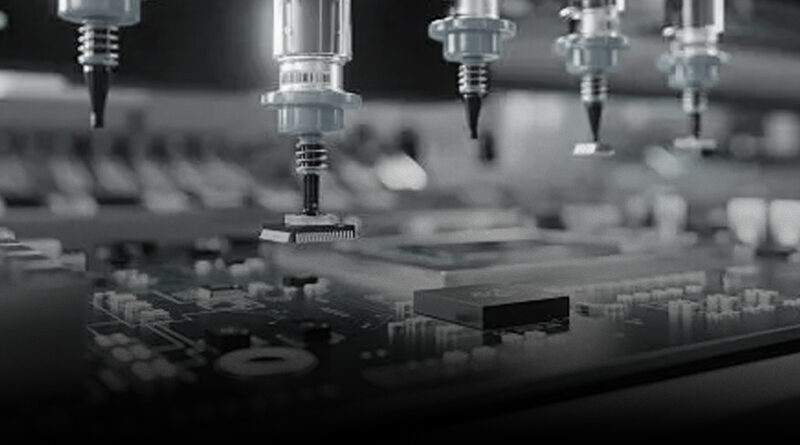
A desktop pick-and-place machine is a compact, usually benchtop device designed to pick up surface-mount components from feeders or tapes and accurately place them onto a printed circuit board (PCB) at precise coordinates. Unlike large production lines, desktop PnP machines emphasize affordability, ease of use, and flexible configurations that suit prototyping, low-volume runs, education, and small labs. They often incorporate integrated cameras for vision alignment, a compact nozzle array for different component types, and software that guides the placement sequence from the CAD design to the finished board. While the core task is the same as its industrial cousins—precise component placement—the desktop variants optimize space, cost, and setup time without sacrificing essential accuracy.
Key components and features to evaluate
When evaluating desktop PnP machines, some features matter more than others depending on your use case. Here are the core elements to weigh:
- Vision system and alignment: A robust cameras-and-software workflow is critical. Modern desktop PnP units use one or two cameras to verify fiducials, part orientation, and placement accuracy. Look for sub-millimeter repeatability and the ability to handle fiducials on your PCB as well as component recognition for quick calibration.
- Placement accuracy and repeatability: This is the heart of the machine. Typical desktop units target tolerances in the range of ±0.05–0.25 mm for common components. If you work with 01005s or micro-BGAs, you’ll need higher end specs and reliable calibration routines.
- Component range and feeders: Check the assortment of nozzle sizes and configurations, plus how you load components (tape feeders, gel-tape, waffle trays, or bulk pick-and-place with a nozzle change). If you need 0402 or smaller, verify the machine’s capability and the software’s overhead for those tiny parts.
- PCB size and board handling: Most desktop PnP machines support boards in the range of a few centimeters up to roughly a 6–8 inch square. If your boards are larger or rectangular, confirm the usable area and any fixtures or staging tricks the vendor offers.
- Software and workflow integration: Intuitive software that maps to common design tools (Gerber, IPC-2581, Pick-and-Place data) minimizes ramp-up time. The best systems offer robust API access, good 3rd-party plugin support, and compatibility with open-source platforms like OpenPnP.
- Vision-to-placement speed: Balance velocity with accuracy. Some machines emphasize rapid placement for standard 0603/0805 parts; others optimize accuracy for fine-pitch components, sometimes at a slight throughput trade-off.
- Upgrade path and services: Look for a clear upgrade path (additional nozzles, cameras, or feeders), reliable customer support, and clear firmware update policies. A strong after-sales program can dramatically reduce downtime in a prototyping lab.
- Power, noise, and footprint: Since desktop machines live on benchtops, ensure they fit your workspace and aren’t disruptive to colleagues or experiments. Quieter operation and efficient power usage are meaningful in shared spaces.
Popular options on the desktop stage in 2026
The market has several well-known and emerging players. Here are representative profiles you’ll encounter, along with what they typically emphasize:
- LumenPnP by Opulo: Marketed as a precise and reliable pick-and-place solution for PCBA prototypes. It’s praised for reducing engineering time and derisking early production by delivering accurate placement in-house. If you value reliability and a smoother transition from design to assembly, LumenPnP is a compelling option to consider alongside other desktops.
- Neoden YY1: An entry-level, tabletop PnP tailored for small shops and institutions migrating from hand-placing. It emphasizes ease of use, affordability, and a gentle learning curve, making it a strong fit for students and smaller labs that want hands-on experience without breaking the bank.
- SparkFun and other hardware-providers: Brands like SparkFun released turnkey desktop PnP solutions designed for quick setup, integrated vision, and straightforward wiring. They often focus on plug-and-play usability with compact form factors and minimal ancillary equipment.
- Boarditto and similar DIY-friendly entrants: These systems emphasize modularity and community-led improvements, often with OpenPNP compatibility and a preference for tinkering and customization. They’re ideal for makers who want to go beyond stock configurations.
In practice, the best choice depends on your component mix, board sizes, and how much you value software openness versus turnkey reliability. NECTEC’s SMT portfolio complements these desktop options by offering a one-stop channel for printing, inspection, conformal coating, and peripheral consumables. If you’re contemplating a desktop PnP for a lab environment, it’s worth mapping out your entire line—from paste printing to inspection—so you know how a desktop PnP will interface with the rest of your equipment.
How a desktop PnP fits into a modern prototyping workflow
To extract maximum value, visualize a typical workflow and how a desktop PnP integrates at each step:
- Design and data preparation: PCB layout is completed in your preferred design tool, followed by Gerber or IPC-2581 generation. You produce a pick-and-place data file (often a component list with coordinates and orientation).
- Paste printing (optional but common): A paste printer deposits solder paste onto PCB pads. Even in a desktop workflow, paste printing is common for mid-volume or precision tasks, though some teams perform hand-soldering for simple boards. Integrated or adjacent systems from the same vendor can improve alignment between paste deposits and component placement.
- Component feeding and vision alignment: Components are loaded into feeders or trays. The PnP machine uses its vision system to align the PCB and to verify component orientation before placement, compensating for any fiducial misalignment or PCB flex.
- Placement and inspection: The PnP places components with the configured nozzle, then optionally passes the PCB to an inline inspection stage (AOI or optical inspection) to verify placement accuracy and detect misplacements or shorts early.
- Reflow and soldering (external): After placement, boards typically go through a reflow oven. Desktop PnP is a component of a broader workflow rather than a standalone end-to-end production line, but for prototypes and low-volume runs, this integration is practical and cost-effective.
- Post-placement testing and QA: Final functional tests, in-circuit tests, or automated visual checks can be performed to ensure the board behaves as intended before moving to the next iteration.
A practical advantage of desktop machines is the ability to iterate quickly. With a few keystrokes, you can correct a misaligned part, adjust the nozzle height, or re-calibrate the camera. For teams that are prototyping complex boards with fine-pitch chips or unusual footprints, this flexibility saves days or weeks per iteration, which translates into faster product validation and customer feedback cycles.
Choosing a desktop PnP for your space: a practical decision guide
Buying a desktop PnP is as much about the ecosystem as the hardware. Use this decision guide to align your choice with your goals:
- Define your component types: Do you place many 0603 and 0402 passive parts, or are you dealing with dense BGAs and QFPs? If you need ultra-fine pitch, prioritize accuracy, calibration, and camera resolution.
- Set a budget with a sanity margin: Desktop PnP prices vary widely based on features. Decide your ceiling, then compare total cost of ownership, including software licenses, maintenance, and potential upgrades.
- Assess software openness: If you value customization or plan to integrate with OpenPnP or other open pipelines, ensure the machine supports open software interfaces and has an active community or vendor support for integration work.
- Plan for support and service: A responsive vendor with reliable documentation, firmware updates, and spare parts is essential for a lab that relies on consistent throughput.
- Workspace and ergonomics: Consider the footprint, noise levels, and accessibility of feeders for operator workflow. A compact, quiet system reduces disruption in shared spaces and labs with multiple users.
- Roadmap for growth: If you anticipate more complex boards or faster throughput in the future, choose a platform with upgrade options or an established upgrade path, so you aren’t forced to replace the machine as needs evolve.
For labs that need a turnkey experience, match the decision with vendor support, service quality, and the availability of peripheral options such as continued soldering, conformal coating, and inspection services. NECTEC’s value proposition is to provide not only a range of SMT equipment but also a seamless support channel—from pre-sales consultation through post-purchase maintenance and consumable provisioning—across the entire production chain. That level of integration matters when you want fewer vendors and less friction in getting a project from concept to completed prototype.
Case study: a typical lab’s path to faster prototyping with a desktop PnP
Imagine a small electronics startup that designs wearables. The team has a handful of engineers who prototype boards every two weeks. They’ve tried manual assembly for small runs, but yield and timing were inconsistent. They add a desktop PnP to their bench and begin a new cycle:
- Week 1: They bring a new board design into production. The desktop PnP places all the passive components with high repeatability. They calibrate the camera using standard fiducials on a test board and confirm placement accuracy within 0.08 mm for most parts.
- Week 2: A micro-LED component array is introduced. They switch to a different nozzle configuration and add a second camera to improve alignment checks on the tiny parts. They run a first shipment of five boards, catching early design issues that would have taken weeks in a manual workflow.
- Week 3: They begin a limited run of 25 boards for a pilot program with an initial customer. Paste printing and reflow are scheduled, and the team uses inline inspection to verify solder joints and component placement before shipping.
Within a month, the team has improved throughput, consistent yields, and a reliable feedback loop to engineering. The desktop PnP didn’t replace every other step in the line, but it dramatically lowered risk for prototypes and early-stage production while freeing up skilled technicians to focus on higher-value tasks like functional testing and firmware debugging.
How NECTEC supports your desktop PnP journey
NECTEC presents a holistic SMT offering that complements desktop PnP hardware with a full spectrum of services:
- PCB handling, printing, soldering, and inspection: The company aggregates essential SMT steps under one roof so you can source components, print solder paste, place components, and inspect boards in a single supply chain.
- Conformal coating and peripherals: If your prototypes will operate in challenging environments, NECTEC can provide conformal coating services and auxiliary consumables to extend PCB life and reliability.
- 24/7 pre-sales support and ongoing post-sales service: A dedicated team helps you overcome purchasing barriers at the outset and maintains long-term satisfaction through ongoing support and maintenance. This service mindset reduces downtime and helps teams stay focused on product development.
For teams evaluating desktop PnP as part of a broader prototyping workflow, aligning with a partner that can supply hardware, software, and downstream process capabilities simplifies procurement and accelerates time-to-market. The combination of credible desktop solutions with NECTEC’s end-to-end SMT capabilities means fewer vendors to manage and more predictable outcomes across prototypes and pre-production runs.
FAQ: common questions about desktop pick-and-place machines
- Do desktop PnP machines handle 0402 and smaller components?: Some models do; however, accuracy and nozzle configuration become critical. If you plan to place 0402 or smaller parts regularly, verify the machine’s minimum feature size, calibration routine, and camera resolution before purchase.
- Can I use OpenPnP with a desktop machine?: Many desktop PnP units are compatible with OpenPnP or offer APIs for integration. If you prefer an open, community-driven workflow, confirm software compatibility with your chosen hardware.
- What kind of maintenance is required?: Regular calibration, nozzle cleaning, camera alignment checks, firmware updates, and occasional sensor cleaning are typical maintenance tasks. A strong vendor or partner program reduces downtime and ensures you stay productive.
- Is a desktop PnP worth it for my startup?: If your product relies on rapid iteration, tight tolerances, and consistent yields at small to mid-scale runs, a desktop PnP can be a wise investment. It can shorten development cycles, improve repeatability, and help you reach customers faster.
Closing thoughts: shaping your path forward
Desktop pick-and-place machines have advanced from hobbyist accessories to serious tools for modern prototyping and small-batch production. The best choice for your team will depend on your components, board sizes, required accuracy, and tolerance for setup and maintenance. In 2026, the landscape includes capable turnkey options and open, configurable platforms that suit engineering-driven environments. What matters most is how the machine fits into your overall workflow—paste printing, placement, reflow, inspection, and continuous iteration. A well-chosen desktop PnP not only speeds up your development cycles but also elevates the quality and reliability of your boards, turning prototypes into credible, production-ready designs sooner than you might expect.
For teams seeking a clear path from concept to prototype with strong support through every stage, consider how a desktop pick-and-place machine aligns with NECTEC’s one-stop SMT offerings. A combined solution—hardware, software, consumables, and professional services—reduces risk, accelerates learning curves, and helps your hardware become real, testable product faster.