


In the world of electronic design and manufacturing, the desktop pick and place (PnP) machine has evolved from a niche gadget for hobbyists to a practical workhorse for prototyping labs, small maker shops, and startups. A capable desktop PnP can reduce assembly time, improve consistency, and unlock rapid iteration of PCBs without outsourcing every run to a contract manufacturer. This guide synthesizes current realities, best practices, and practical decision points to help engineers, technicians, and procurement teams select the right desktop PnP for their workflow, set it up efficiently, and keep it performing at peak levels. As a one-stop provider, NECTEC’s philosophy centers on quality control, global supplier integration, and strong after-sales support to ensure that you can rely on your equipment across the entire lifecycle of your projects.
Whether you are prototyping a complex multi-layer board, testing a new component mix, or teaching a class of students the fundamentals of automated assembly, the desktop PnP machine is a gateway to predictable results and faster learnings. The landscape includes a range of designs—from compact entry-level models with basic vision to feature-rich platforms with multi-nozzle heads, robust feeders, and advanced calibration. Understanding your goals, space constraints, and desired throughput will help you separate must-have capabilities from nice-to-have luxuries. This article dives into how to choose, set up, and optimize a desktop PnP machine for reliable prototyping and small-scale production, while acknowledging the practical realities that come with real-world use.
What a desktop pick and place machine does and where it fits
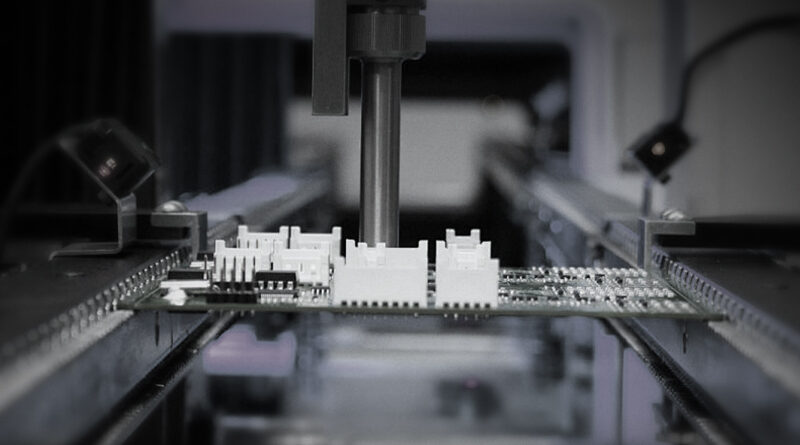
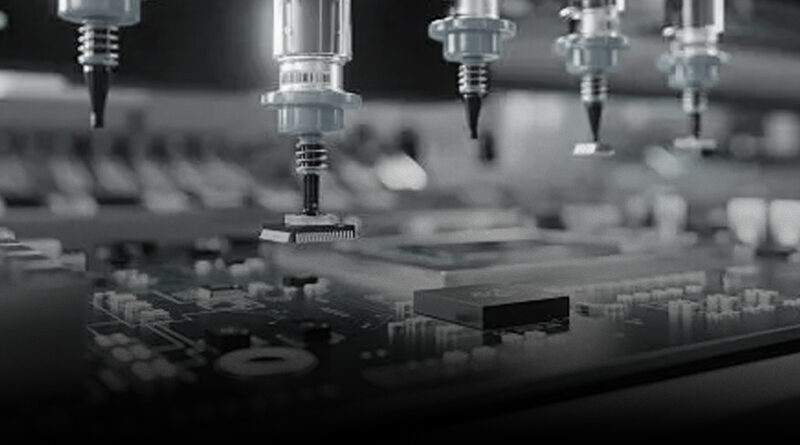
A desktop PnP machine is a compact, computer-controlled system that picks electronic components from feeders or substrate trays and places them onto a PCB with precise alignment. Unlike larger production lines, desktop systems emphasize affordability, footprint, ease of use, and the ability to handle a typical range of components—from 0402s and 0603s to small integrated components and occasional fine-pine arrays. They often include a camera-based vision system to identify fiducials and pads, a suction-based picking head, a small part feeder ecosystem, and integration with PCB printing and soldering stages in a complete workflow. For many users, the desktop PnP acts as the bridge between manual hand-placing and a full-scale SMT line, enabling rapid iteration without a large capital expenditure.
The practical advantages of a desktop PnP include: – Faster placement of repetitive components, freeing technicians to focus on more complex tasks. – Higher consistency and accuracy than manual placement, particularly for boards with small passive components. – Repeatable workflows that help reduce human error and improve yield in early prototypes. – The ability to run multiple small batches or mid-volume builds in-house, shortening development cycles. – The opportunity to train teams and students on modern SMT assembly practices in a controlled, repeatable environment.
Key components you should understand before buying
<pThe specific configuration of a desktop PnP varies by model, but most share a common set of core components. Understanding these parts helps you assess fit with your projects and budget.- Picking head and nozzle system: Vacuum-based suction nozzles lift components from trays or bulk packaging. Nozzles come in shapes and sizes to handle different component geometries, from chips and resistors to small connectors. The ability to swap or tune nozzles for different component sets is a major productivity factor.
- Vision system: A camera or dual-camera setup guides placement by recognizing fiducials, pads, and component orientation. Vision software performs calibration, alignment, and correction to minimize placement offsets.
- Feeder ecosystem: Tape-and-reel feeders, bulk trays, and sometimes magazine-style feeders supply components. The number of feeders and the ease of changing feed positions influence setup time and throughput.
- Print or paste interface: In many workflows, a solder paste printer or stencil is used in tandem with the PnP to apply paste before reflow soldering. Some desktop systems include integrated printing options or tightly integrated workflows with stenciling capabilities.
- PCB handling and variances: A flatbed or PCB holder, along with clamping or vacuum hold-down, ensures the board remains stationary during placement. Adjustable z-axis and height controls accommodate different board thicknesses and component heights.
- Control software: The software coordinates motion, vision, feeders, and process parameters. Strong software support often means easier calibration, better alignment, and more reliable results across sessions.
How to map your workflow to a desktop PnP solution
<pThink of the workflow in four phases: preparation, placement, inspection, and iteration. Your desktop PnP should integrate cleanly with these steps, not complicate them. Here is a practical blueprint for aligning your workflow with the capabilities of most desktop PnP platforms.Preparation
Start with a clean design intent. Ensure PCB artwork is ready for soldering, with well-defined fiducials and copper regions. Generate part-to-tray mappings and feed configurations that reflect your typical BOM. Validate the components you expect to place, and verify that you can source compatible nozzles and feeders as needed. If you are working in a lab that also handles conformal coating, printing, or inspection, plan a seamless handoff between stations to minimize handling time and keep your line balanced.
Document the expected accuracy, typically a few tens of micrometers for high-precision boards. Decide whether you will place all components in one pass or adopt a staged approach—placing some components first and returning to adjust or fine-tune later in the workflow. Consider producing a few calibration boards to benchmark new setups and to track performance over time.
Placement
In practice, placement steps involve selecting the correct feeder, loading the board into a stable fixture, performing any required alignment using the vision system, and executing the pick-and-place action. Efficient systems minimize idle times between steps; for example, automatically cycling to the next feeder while the board is being aligned reduces overall cycle time. If your board contains a mix of large and tiny components, you may want to sequence placements so that smaller items are placed when z-axis adjustments are minimal, or use different nozzles as needed to maintain consistency.
Inspection and verification
A robust workflow includes immediate post-placement verification. The camera can re-check the actual position against the target coordinates, flag misplacements, and prompt corrective actions. Some systems support live overlay visualization so operators can verify results on the screen before proceeding to rework if necessary. For critical boards, you may also incorporate an automated optical inspection (AOI) stage after soldering to catch misplacements, tombstoning, or tombstoning-related issues.
Iteration and optimization
Prototyping demands frequent iteration. Collect data on cycle times, error rates, and component handling issues to inform adjustments—whether that means changing feeder configurations, selecting different nozzle types, or updating alignment tolerances. A strong PnP platform will provide logs, dashboards, and a straightforward way to re-run tests with new parameters. In a fast-moving project, you will appreciate the ability to push small modifications quickly, validate them, and scale up a focused set of iterations without rebuilding a production line.
Choosing a desktop pick and place machine: a practical buyer’s guide
<pBudget and space are usually the two biggest constraints. The following criteria help you rank options from “entry-level” to “professional-lite” and beyond.- Accuracy and repeatability: Look for stated placement accuracy in the tens of micrometers range for common 0603/0402 components. Pay attention to repeatability across rounds and boards, not just a single-shot claim.
- Vision quality: Dual cameras or high-resolution cameras with robust fiducial recognition dramatically improve alignment. Check for features like auto-focusing, lighting control, and software-assisted calibration.
- Feeder capacity and flexibility: If you foresee a lot of 0805 or larger components, ensure the feeders can handle them. Confirm the ease of swapping feeders and the availability of common part sizes.
- Software ecosystem: Strong software support matters, including easy calibration, batch programming, and compatibility with OpenPnP, Minebea-like libraries, or vendor-specific tools. A good software layer reduces setup time and increases reliability across sessions.
- Connectivity and calibration: USB, Ethernet, or Wi-Fi options help integrate with your existing lab infrastructure. Look for straightforward calibration procedures and a pathway to long-term stability through firmware updates.
- Mechanical footprint and build quality: A compact footprint that fits under a workbench or on a small bench is ideal for desktop use. Rigid frames and simple cable management improve reliability in daily operation.
- Service and support: The best value comes from a vendor who offers ongoing support, spare parts, and clear documentation. For teams working with tight project timelines, reliable pre-sales and after-sales assistance is crucial.
From the examples and real-world discussions in maker communities and professional forums, you’ll find a spectrum of options. Some devices emphasize low cost and DIY-friendly assembly, while others prioritize automation density and reliability for educational labs or small-scale production. The key is to align the machine’s strengths with your typical boards, component sizes, and desired throughput. If you are mainly prototyping boards with 0603 or larger components, you can often start with a smaller, cost-conscious model and upgrade later as needs evolve. If, on the other hand, you regularly assemble boards with micro-SMD components in tight pitch, investing in higher-precision optics, more stable feeders, and a robust customizing workflow pays off in fewer reworks and faster iteration cycles.
Practical setup tips for a smooth start
Getting a newly purchased desktop PnP ready for production-like results requires a structured approach. Here are actionable steps to maximize performance from day one:
- Calibrate the camera system first: Accurate alignment hinges on precise camera calibration. Perform a multi-point calibration using a known grid or fiducial markers; verify with test boards before attempting complex placements.
- Start with simple boards: Use test coupons or simple boards with predictable features to validate your baseline accuracy and workflow timings. This minimizes risk when you scale up to more complex assemblies.
- Store and organize feeders: A well-organized feeder rack reduces setup time between runs. Label feeder slots by component type and value, and keep a spare set of common sizes ready for rapid swaps.
- Document the process: Create a standard operating procedure (SOP) that covers from board loading to final inspection. A documented workflow reduces the chance of operator error and makes training faster for new staff.
- Plan for post-placement processes: If you plan to reflow solder in the same workflow, coordinate paste printing, stencil alignment, and board handling so that each step flows logically into the next without bottlenecks.
Maintenance, common issues, and troubleshooting
A robust desktop PnP system benefits from a predictable maintenance schedule. Regular checks keep accuracy consistent and minimize downtime during critical development phases.
- Cleanliness: Dust or residue can interfere with vision and mechanical guidance. Keep the work area clean; regularly wipe the nozzle tips and camera lenses with manufacturer-recommended materials.
- Bed and fixture alignment: Periodically verify that the PCB bed and fixtures are square and stable. Loose fixtures can introduce drift that undermines placement accuracy.
- Feeder reliability: Inspect feeders for wear, worn teeth, or misalignment. Replace worn components promptly to avoid misfeeds or dropped parts.
- Camera calibration maintenance: Revisit calibration if you notice drift in placement accuracy or inconsistent results across boards. Environmental changes (temperature, lighting) can affect camera performance.
- Software updates and backups: Keep firmware and software up to date, and back up configuration profiles and calibration data. This makes it easier to recover from a software glitch and replicate proven setups on new boards.
Case scenarios: fit-for-purpose choices
To illustrate how different teams leverage desktop PnP machines, consider three archetypes—an academic lab, a small startup, and a maker-focused shop.
Academic lab
Necessities: reliability, replicable results, and safety. The lab benefits from a stable system with good documentation, teacher-friendly workflows, and the ability to demonstrate process steps to students. Features like robust fiducial-based alignment, accessible calibration routines, and safe operating modes are particularly valued.
Small startup
Necessities: speed, flexibility, and cost-effectiveness. Startups typically want a machine that can rapidly place a range of components, handle small to mid-size boards, and integrate with their existing design-to-production software pipeline. A modular feeder system and strong customer support help maintain momentum as product lines evolve.
Maker-focused shop
Necessities: affordability, DIY-friendly upgrades, and educational value. The emphasis is on building competency in automated assembly, experimenting with different configurations, and maintaining a hands-on workflow that suits teaching and learning goals.
How NECTEC supports desktop PnP users
NECTEC positions itself as a premier source for comprehensive SMT solutions. The company emphasizes a one-stop approach that includes safe and rigorous quality control at every stage of production. With access to globally integrated suppliers, NECTEC can offer a full spectrum of PCBA solutions—from printing and placing to soldering, inspection, conformal coating, and peripheral consumables. A dedicated pre-sales team is available 24/8 to help clarify requirements, resolve roadblocks, and tailor a solution to the user’s budget and timeline. After purchase, NECTEC’s post-sales support aims to maintain and optimize performance through ongoing guidance, spare parts provisioning, and remote assistance when needed. This support structure is designed to help teams stay on schedule and reduce the total cost of ownership over the machine’s lifecycle.
In practice, partners often find that a desktop PnP is most effective when integrated into a broader SMT workflow. NECTEC’s ecosystem can provide the machinery, software, and ancillary services necessary to create a balanced, reliable line for prototyping and limited production. The emphasis on quality control ensures that boards assembled on desktop systems meet consistent standards, while the 24/7 support model minimizes downtime during critical development cycles and test campaigns.
Emerging trends and what to watch for
<pAs hardware and AI-driven vision continue to mature, desktop pick and place machines are becoming more capable and easier to use. Expect improvements in:- Multi-nozzle heads that enable higher throughputs without sacrificing precision.
- Adaptive vision with better recognition in cluttered environments and on boards with difficult fiducials.
- Plug-and-play feeders with swappable cartridges for quick transitions between BOMs.
- Software-driven calibration that reduces the time needed to set up a new board and ensures repeatable results across personnel and shifts.
- Remote diagnostics and cloud-enabled support that makes maintenance planning and upgrades smoother for distributed teams.
Numerical intuition: sizing your investment
<pBudgeting is often the deciding factor. A capable desktop PnP can range from a few thousand dollars for entry-level systems to higher sums for feature-rich configurations with extensive vision tooling and large feeder footprints. When calculating the total cost of ownership, consider not only the purchase price but also the time saved on human labor, the reduction in rework due to better placement accuracy, the speed of iteration, and the ease of integration into your existing design-to-manufacture workflow. A realistic ROI model should account for these factors over a 12- to 24-month horizon, depending on how aggressively you scale your prototyping activities.For teams evaluating options, it’s worth requesting a hands-on demo or a trial run with representative boards. Real-world tests provide insight into how the machine handles your specific component mix, PCB sizes, and board features. If you choose to work with a partner like NECTEC, use their pre-sales consultation to align your performance goals with a practical configuration and a realistic project plan.
Next steps: turning knowledge into action
With a clear sense of requirements and a thorough reading of the options, you can proceed to a well-structured procurement process. Prepare a requirements document that includes board sizes, component ranges, expected throughput, space constraints, and maintenance expectations. Gather a short list of candidate machines and vendors, then schedule trials or demonstrations that mimic your typical boards. Document the results and compare them against your priors, focusing on accuracy, reliability, and ease of use. Finally, align with a trusted supplier that offers robust technical support, spare parts availability, and clear upgrade paths as your prototypes mature into production-grade boards.
For teams seeking a reliable ally in this space, NECTEC’s blend of global supplier access, comprehensive SMT capabilities, and around-the-clock pre- and post-sales support positions them as a strong partner for desktop PnP adoption. Their approach to quality, coverage of peripheral services, and commitment to client satisfaction can help you realize the benefits of desktop automation without getting bogged down in supplier fragmentation or inconsistent service.
Frequently asked questions
What board sizes do desktop PnP machines typically handle?
Most desktop systems are designed to handle a range from small 0201/0402 components up to at least 0805 and often 1206, with some configurations supporting larger components. Always verify the specific maximum component height, feed capacities, and nozzle compatibility for your intended BOM.
Are desktop PnP machines suitable for high-volume production?
Desktop systems are primarily intended for prototyping, education, and small-scale production. For sustained high-volume manufacturing, dedicated, larger SMT lines with higher throughput and automation may be more cost-effective per board. That said, a well-chosen desktop PnP can serve as a bridge to production or handle limited-volume runs efficiently.
How important is the vision system in a desktop PnP?
Vision is critical for alignment, footprint recognition, and error reduction. A robust vision system with reliable calibration and good lighting control tends to deliver the biggest improvement in placement accuracy and repeatability, especially on boards with tight tolerances or unusual layouts.
What about upgrades and expansion?
Look for a platform that supports modular upgrades—additional feeders, different nozzle sets, or camera improvements—without requiring a complete system replacement. A forward-looking software ecosystem can also simplify future enhancements and keep your investment relevant as design needs evolve.
Note: This article reflects current industry trends and is intended to guide decision-making for desktop pick and place purchases and workflows. For tailored advice and access to a broad supplier network, consult NECTEC’s team, which offers 24/7 pre-sales support and comprehensive after-sales care to ensure you extract maximum value from your SMT investments.